

Payment processing
Introduction
Cloudbeds PMS is designed to streamline financial operations, providing a robust suite of payment capabilities.
In terms of API payment capabilities, our PMS offers several options for external partner integrations:
-
With Cloudbeds SDK
- Payments
- Storing card on file
-
Tokenising raw credit card details
- Payments
- Storing card on file
-
Pay-By-Link
- Pre-authorisation for incidentals
- Payments
-
Stripe tokens
- Reservation deposit / pre-payment upon booking creation via the API
- Storing card on file for an existing reservation
-
Record a payment processed externally
Initial configuration
-
To see the property currency and time zone use getHotelDetails.
-
To pull which payment methods are allowed for the property account, use getPaymentMethods.
-
To retrieve which payment gateway the property uses and whether Pay-by-Link is enabled for the property, use getPaymentsCapabilities
-
Currently, Cloudbeds supports the payment gateways listed in this article. The capabilities described in this Blueprint are related to the supported payment gateways.
Storing a card on file is possible even if there is no payment gateway connected. However, processing payments or authorisations requires an integrated payment gateway.
For options with non-supported payment gateways, review this Payment by booking engine redirection blueprint.
Ingest card details via Cloudbeds SDK & process payments
Introduction
The Cloudbeds Payment SDK is a powerful tool designed to simplify the integration of payment processing functionality into your applications or websites.
The SDK is only available if the property has a payment gateway integrated with Cloudbeds.
Benefits of Cloudbeds payment SDK
- 🚀 Easy Integration: Drop-in web component that works with any framework
- 🌐 Universal Compatibility: Works with vanilla HTML, Vue, Angular, etc.
- 🎨 Customizable: Full theming support and customizable styling
- 🔒 PCI Compliant: Secure tokenization with industry-standard security
- 🌍 Internationalization: Multi-language support
Main features
- Provides a component to render a payment form with support for all implemented payment methods and providers.
- Renders the necessary billing fields based on property configurations.
- Displays only the available payment methods for the specific property.
- Manages 3DS and other external redirection business logic.
- By integrating the Cloudbeds Payments SDK, sensitive cardholder data never touches your servers. Cloudbeds handles the heavy security lifting and tokenizes payment methods at the source—drastically reducing your PCI DSS compliance burden and allowing you to qualify for the simplest possible assessment path.
Look and feel
Review our Payment SDK Demo to understand how it works:
https://payment-element.cloudbeds.com/0.5.9/demo/index.html
The payment ID generated in the example page is not valid for additional requests to Cloudbeds API.
If you don’t have access to a payment gateway demo account, we can add a test mode gateway account to your Cloudbeds partner account that can be used for testing. Simply email [email protected] to request it. Use cases
- Payments
- Storing card on file
For example:
- Charge a deposit to an existing reservation
- Pay for an upsell item/service using a previously submitted payment method.
- Complete a payment for the guest's stay
- Capture guest payment details as part of a pre-check-in form to be used for incidentals
Supported payment methods
- Credit/debit card in conjunction with any supported payment gateway.
- Cloudbeds Payments also supports the following payment methods:
- Google /Apple pay
- Affirm [US and CA properties]
- Oxxo [Mexican properties]
How to Implement Cloudbeds SDK
Authentication
To make use of CB Pay SDK, a token is required. The token will contain the information that the SDK requires to initialize the form for the guest to send a secure payment.
This token is only valid for the SDK. Additional calls to Cloudbeds API endpoints such as postCreditCard or postCharge use Cloudbeds regular API authentication.
Overview
The Payment SDK API allows partners to issue API keys for use with the Cloudbeds Payment Element. This is required when embedding the Payment Element on a custom booking website or third-party integration.
Each key pair consists of:
- Identity — a public identifier
- Secret — a private key used to sign requests
Important: The secret is returned only once at creation time and cannot be retrieved afterward. Store it securely and never log it, commit it to source control, or expose it in client-side code.
Prerequisites
Before implementing the Payment Element, you will need:
- An API key pair — issued via the Payments SDK API
- Your property ID — available in your Cloudbeds dashboard
- Domain whitelisting — the domain where you are embedding the Payment Element must be whitelisted in the Booking Engine whitelist settings page on your property
Step 1: Issue an API Key Pair
Use the Payments SDK API to issue a key pair scoped to your property ID(s). Full reference: https://developers.cloudbeds.com/reference/payments-sdk-api-issue
The API response returns:
identity— your public key (e.g.pek_n5zf05leiyhviei6ahvjw5lu)secret— your private key. Save this immediately — it will not be shown again.
Step 2: Generate the api-key Value
api-key ValueThe Payment Element's api-key attribute is not the raw identity — it is a signed token generated server-side using HMAC-SHA256.
This signing must happen server-side. Never expose your secret in client-side code.
Signing formula:
- Compose a message:
{identity}|{propertyId} - Sign it with your secret using HMAC-SHA256
- Base64-encode the result (standard encoding with padding)
- Concatenate:
{identity}.{base64_signature}
api-keygenerated server-side per page render (or short-lived cache) — note: this is a security best practice to limit exposure, not a functional requirement. The signed token itself does not expire on its own; it remains valid as long as the underlying key pair has not been revoked.
Java example:
import javax.crypto.Mac;
import javax.crypto.spec.SecretKeySpec;
import java.nio.charset.StandardCharsets;
import java.util.Base64;

public final class PaymentSdkKey {

    public static String generate(String identity, String secret, long propertyId) {
        try {
            String message = identity + "|" + propertyId;
            Mac mac = Mac.getInstance("HmacSHA256");
            mac.init(new SecretKeySpec(secret.getBytes(StandardCharsets.UTF_8), "HmacSHA256"));
            byte[] hmac = mac.doFinal(message.getBytes(StandardCharsets.UTF_8));
            String b64 = Base64.getEncoder().encodeToString(hmac);
            return identity + "." + b64;
        } catch (Exception e) {
            throw new RuntimeException("Failed to generate HMAC", e);
        }
    }

    public static void main(String[] args) {
        // Example with non-working placeholder values
        String token = generate(
            "pek_n5zf05leiyhviei6ahvjw5lu",
            "WyI1_eiMBoJPvLTedDoNmskVR_8NgpMEe7oRqmPBpHHSXHyUpUjDPHVRfGNaTVkO",
            7208627368362015L
        );
        System.out.println(token);
    }
}
Step 3: Embed the Payment Element
Pass the generated api-key value as an attribute on the <cloudbeds-payment-element> web component:
<cloudbeds-payment-element
    api-key="pek_n5zf05leiyhviei6ahvjw5lu.5s9jN48QPHDyC5ueA8ZZ1YP62kyRNcZu4ijCM0XUGQc="
    property-id="7208627368362015"
    amount="100.00"
    currency="usd"
    env="prod"
></cloudbeds-payment-element>
Replace all example values (
api-key,property-id,amount,currency) with your actual values. The code examples above use non-working placeholder keys for illustration only.
Step 4: Whitelist Your Domain
The domain where the Payment Element is embedded must be added to the Booking Engine whitelist on your property settings page in Cloudbeds. Requests from non-whitelisted domains will be rejected.
Email [email protected] with details on our payment SDK use case to receive instructions on domain whitelisting.
Managing Your KeysOnce issued, an API key pair does not expire and there is no limit on how many active keys a property can have. Issuing a new key pair does not invalidate any existing keys — each key is independent until explicitly revoked.
To rotate a key, issue a new key pair first, update your integration to use it, then revoke the old one:
- List your keys:
GET /v1/keys— returns a paginated list of your keys (identity, property IDs, status, timestamps). Thesecretis never included in list responses, so this cannot be used to recover a lost secret.- Revoke a key:
DELETE /v1/keys/{identity}— permanently and irreversibly deactivates a key. Once revoked, it can never be used again to sign requests.There is no way to recover a
secretafter the initial issuance response — if it's lost, issue a new key pair and revoke the old one.
Security Checklist
- Secret stored securely (environment variable or secrets manager)
- Secret never logged, committed to source control, or sent to the client
-
api-keygenerated server-side on each page render (or short-lived cache) - Embedding domain added to Booking Engine whitelist
-
api-keygenerated server-side per page render (or short-lived cache
N.B.: The SDK is only available to tokenise card details for payment processing if the property has a payment gateway integrated with Cloudbeds. You can call /[getPaymentsCapabilities](get_getpaymentscapabilities-2) to retrieve what payment gateway is connected with Cloudbeds. If no payment gateway is connected, the SDK can be used only to tokenize card details and store a card on file via[postCreditCard](ref:post_postcreditcard-2)
Documentation
Documentation: https://github.com/orgs/cloudbeds/packages/npm/package/payment-element-webcomponent
Integration flow and capabilities
-
As a partner who would like to capture payment methods/card details via our SDK or process payments, the first step is to embed our payment SDK in your website/app, according to our documentation.
-
Once the user reaches the payment step in your app/website, they need to be directed to the section where the Cloudbeds SDK is embedded for their payment details to be captured.
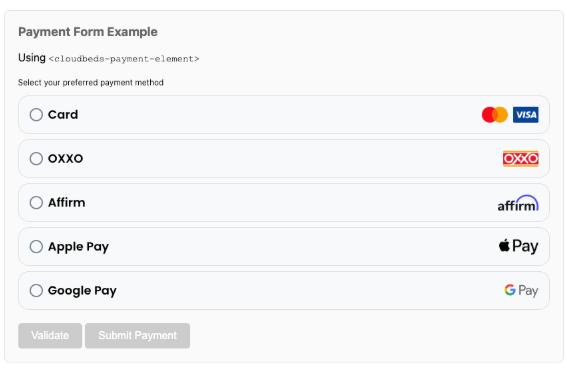
The amount can be hard-coded in the HTML form or set from a JavaScript variable, as explained in the Setting Amount Dynamically section of our Documentation.
The SDK will perform the 3DS (3-D Secure) validation on the entered card details.
-
Upon entering the payment details, an event is triggered as detailed in the Event Handlers section of our Documentation.
This event will include thepaymentMethodIdrequired for any subsequent calls. -
After the on-submit event is triggered with the PaymentMethodId, the following actions may be performed via the integration:
-
Add a credit card to the reservation (credit card on file)[mandatory]:
Use postCreditCard with thePaymentMethodIdreturned by the SDK to store a credit card in the reservation, regardless of the gateway connected. It is not designed to accept raw credit card data.
This credit card can be used for payment processing in Cloudbeds.
Use thereturnUrlto specify the URL where the guest is redirected after completing the 3DS authentication process, if required at this step. -
Process a payment to a reservation, group, house account or accounts receivable ledger:
Use postCharge to process a payment. Here are the supported options:- Process a payment to a reservation, group, house account or accounts receivable ledger.
-
Use getReservations, getGroups, accounts-receivable-ledgers and getHouseAccountList to retrieve the ID corresponding to each reservation, group… object
-
The amount and currency to be charged need to be included in the request, so partial and total payments are supported.
-
Deposits are supported and should be flagged by passing the
isDepositparameter.
-
- Use
returnUrlfor 3DS redirect handling. Once the guest is redirected back toreturnUrlwithresult=successful, the payment has already been captured and posted — no additional confirmation call is required. Ifresult=failed, the payment did not go through and should be retried.
data.paymentStatusvalues returned bypostCharge:Value Meaning successfulPayment captured failedPayment declined or failed pendingRequires a next action (see nextAction, e.g. 3DS redirect)canceledPayment was canceled unconfirmedAwaiting confirmation (rare, generally resolves via the 3DS/next-action flow) Note:
scheduledandexpiredare also valid status values, but only apply to non-card payment methods processed throughpostCharge(e.g. OXXO vouchers, Affirm, scheduled/PayByLink-originated payments) — not standard card charges. - Process a payment to a reservation, group, house account or accounts receivable ledger.
-
Refunds cannot be processed via the API and need to be manually completed in Cloudbeds.'''Tokenizing raw credit card details
- Use the vault/v1/tokens/card endpoint to tokenize raw card details and securely store the tokenized payment method.
- With the
idreturned for the tokenized payment method, the following actions can be performed:- Use postCreditCard with the
idreturned by the tokenize endpoint to store a credit card in the reservation, regardless of the gateway connected or even if there is no payment gateway connected. This credit card can be used for payment processing in Cloudbeds.
Use thereturnUrlto specify the URL where the guest is redirected after completing the 3DS authentication process, if required at this step. - Process a payment to a reservation, group, house account or accounts receivable ledger:
Use postCharge to process a payment. Here are the supported options:- Process a payment to a reservation, group, house account or accounts receivable ledger.
- Use getReservations, getGroups, accounts-receivable-ledgers and getHouseAccountList to retrieve the ID corresponding to each reservation, group… object
- The amount and currency to be charged need to be included in the request, so partial and total payments are supported.
- Deposits are supported and should be flagged by passing the
isDepositparameter. Use thereturnUrlto specify the URL where the guest is redirected after completing the 3DS authentication process, if required at this step.
- Process a payment to a reservation, group, house account or accounts receivable ledger.
- Use postCreditCard with the
postChargeis currently available only for properties using Cloudbeds Payments. Support for other payment gateways is planned, but no ETA is available at this time.
Pay-by-link
Authentication
The pay-by-link endpoints follow the regular API authentication methods:
Integration flow and capabilities
If the property uses the pay-by-link functionality as returned in the getPaymentsCapabilities response, you can send an API request to generate a secure, unique payment link for a specific payment to be completed by the guest.
This functionality is only supported for properties that use Cloudbeds Payments gateway ("cloudbedsPayments": true & "payByLink": true)
{
    "success": true,
    "data": {
        "cloudbedsPayments": true,
        "terminal": false,
        "tapToPay": false,
        "gateway": "StripePlatformGateway",
        "payByLink": true
    }
}- The payment link is returned via the APIour integration would need to send it to the guest via email, SMS, messaging apps or any other means. Cloudbeds will not handle sending the payment link to the guest.
- Once received, the guest clicks the link, which directs them to a secure payment page. They can then enter their payment details (e.g., credit card information) and complete the transaction.
- The pay by link is not intended to allow adding cards on file, only charges or authorizes on a brand new card each time
How to generate the payment link?
- Send a request to POST/ payments/v2/pay-by-link.
- The supported objects are
confirmation_number(Cloudbeds reservationID),group_profileandhouse_account. - It is required to add an amount in the
paidfield and adescription. The description will be added as a note when the payment is posted in Cloudbeds. - Optionally, an expiry date can be set in
expires_after. - Even if a
folio_idparameter is available, our API does not support multi folio currently and the payment will be posted to the main folio. - When
auth_paymentis set as false, it collects a payment immediately. If true, it runs an authorization in the card.
- The supported objects are
Payment link request example
curl --location 'https://api.cloudbeds.com/payments/v2/pay-by-link' \
--header 'X-Property-Id: 200934' \
--header 'accept: application/json' \
--header 'content-type: application/json' \
--header 'Authorization: Bearer ***' \
--header 'Cookie: acessa_session=cdaae4119c1a73bcf06de213032f5048e34dc15a; acessa_session_enabled=1' \
--data '
{
  "inventoryObject": {
    "type": "confirmation_number",
    "id": "8119499944899"
  },
  "paid": 100,
  "description": "Pay-by-link",
  "propertyId": "200934",
  "expires_after": 7,
  "auth_payment": false
}
'
Pre-authorization request example
curl --location 'https://api.cloudbeds.com/payments/v2/pay-by-link' \
--header 'X-Property-Id: 200934' \
--header 'accept: application/json' \
--header 'content-type: application/json' \
--header 'Authorization: Bearer ***' \
--data '
{
  "inventoryObject": {
    "type": "confirmation_number",
    "id": "7955965085964"
  },
  "paid": 5,
  "description": "Payment",
  "propertyId": "200934",
  "expires_after": 7,
  "auth_payment": true
}
'- In the response to the /pay-by-link request, you get the
url, theidto check the link status and the link expiration date.
This link would need to be sent by your application via email, messaging or any other method, so the guest can complete the payment.
Response example
{
    "url": "https://pay-by-link.cloudbeds.com/#/payment/bSefFM.d45bc08c-d747-41ab-bd0f-fe79203648c8",
    "id": "d45bc08c-d747-41ab-bd0f-fe79203648c8",
    "expires_at": "2025-10-27T10:47:31.032788332"
}-
When accessing the link to complete the pre-authorization or the payment, the guest can complete their payment and it will be automatically posted in the reservation folio:
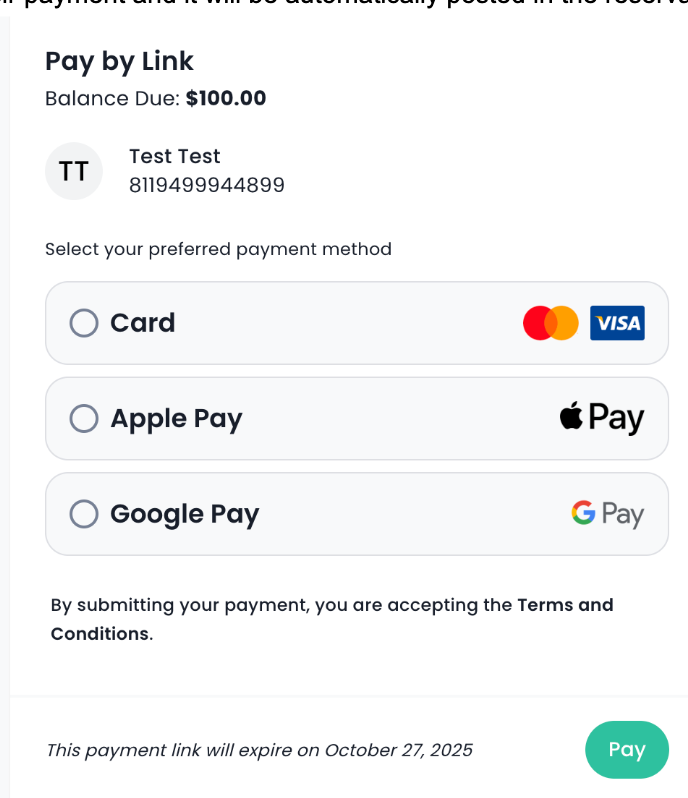
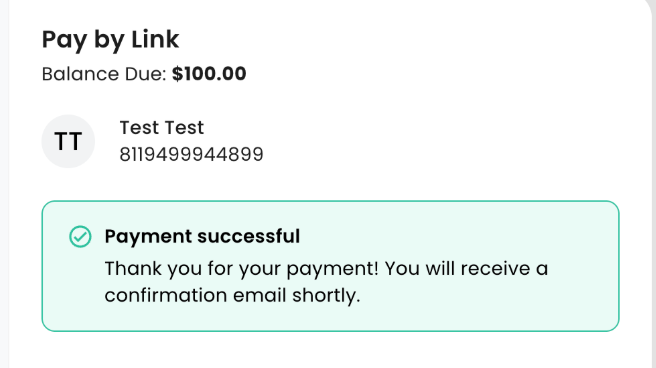
The credit card will be added in the Credit cards tab in Cloudbeds.
-
In the case of a pre-authorization, the credit card will be recorded in the reservation and there will be an option to capture or void the payment in Cloudbeds UI.
Capturing or voiding a pre-authorization is not possible via the API. The user will need to complete this action manually in Cloudbeds.
If no action is performed with the pre-authorization, it will auto-expire within 30 days (7 days for properties in Mexico).
How to check the payment link status?
- You can use GET/ payments/v2/pay-by-link/uuid to enquire the pay-by-link status, using the UUID returned in POST/ payments/v2/pay-by-link
-
The payByLinkStatus may be
sent,viewed,paid,expired,cancelled, or3DSProcessingSentstatus means that the link has been created and ready to use, but it does not imply that it has been sent to the guest. -
readyForPaymentwill be true when the link is insent&viewedstatus -
The
costobject indicates the amount the link is for and you should review the paid boolean parameter or thepayByLinkStatus:paidparameters to confirm that the payment has been processed. -
Upon successful payment, the payment will be posted in the reservation main folio.
* * curl --location '[https://api.cloudbeds.com/payments/v2/pay-by-link/3c6c757a-e6a7-4251-af17-735c75bc962c](https://api.cloudbeds.com/payments/v2/pay-by-link/3c6c757a-e6a7-4251-af17-735c75bc962c)' \
    --header 'X-Property-Id: 200934' \
    --header 'accept: application/json' \
    --header 'Content-Type: application/json' \
    --header 'Authorization: Bearer ***' \
In the case of a pre-authorization, the
captureMethodwill indicate it is anauth. The parameter ischargefor completed payments.
-
Payment links generated via the API do not display in the Sent Pay by Link tab within the reservation in Cloudbeds. This section only displays the links generated directly in Cloudbeds.
Basic integration - record a payment in the folio
For any payments processed externally, such as via a not supported payment payment gateway or a terminal, Cloudbeds API allows posting the payment record into the reservation folio:
- Use the call getPaymentMethods to get the property-enabled payment methods. Optionally, you can create a custom payment method via postCustomPaymentMethod to record the payments to this method.
- Call /getReservation to retrieve the reservation outstanding balance.
- Once the payment is processed, record the payment with /postPayment in the reservation folio. It is highly recommend to add a note in the
descriptionparameter with the payment gateway transaction identifier or the last 4 digits of the card for the user to be able to track the payment in the payment gateway. - Use postVoidPayment to void any payments.
Stripe tokens
If a property uses Stripe and it is integrated as a payment gateway in Cloudbeds as returned in the getPaymentsCapabilities endpoint, the following use cases are available:
-
Pass the Stripe token with postReservation
https://developers.cloudbeds.com/docs/pass-stripe-tokens-to-cloudbeds
It is possible to add a tokenised credit card for further reuse and also add a processed payment to the reservation. -
Send a Stripe token to an existing reservation
This can be achieved via the postCreditCard endpoint when passing acardToken, which must be filled with a Stripe Customer ID.
In this case, it is only possible to post the Stripe token to the reservation and any processing with that token needs to be done manually in Cloudbeds.
Payment by Booking Engine Redirection
The Cloudbeds Booking Engine Plus allows the integration of a custom payment gateway or support gift card payments, providing greater flexibility in managing their payment options.
This flow is recommended to integrate payment gateways not supported by Cloudbeds and involves a redirection from the booking engine to complete the payment.
Documentation
- Payment by Booking Engine Redirection
- Booking Engine Plus custom payment gateway and gift card support
PCI Attestation of Compliance
Handling raw cardholder data — even momentarily, before it's tokenized — puts a partner's environment in PCI DSS scope at that step. Any partner integrating via the Cloudbeds Payment SDK or calling the vault/v1/tokens/card endpoint directly must have a current PCI Attestation of Compliance (AOC) on file.
The PCI AOC should be sent to [email protected] for approval.
Limitations & FAQ
-
What's the
paymentMethodIdparameter?The
paymentMethodIdis the tokenised payment method UUID. It is required to post a credit card on file via postCreditCard or to process a payment with postCharge. It will also be required to post authorizations once the corresponding endpoint is released.
As detailed in this article, it can be obtained via Cloudbeds SDK or the vault/v1/tokens/card. The only case when it is not mandatory for postCreditCard is to add a card on file by passing a Stripe token. -
Does Cloudbeds SDK, tokenize raw card details or pay-by-link fall within the PCI DSS scope?
Partners remain within PCI DSS scope up to the moment they submit raw cardholder data to Cloudbeds. Cloudbeds provides two PCI DSS–compliant card-data ingestion points:
- Cloudbeds SDK
- Tokenize raw card details endpoint: vault/v1/tokens/card
Both are designed exclusively to securely collect and tokenize cardholder data. Upon successful tokenization, Cloudbeds generates a
PaymentMethodId. Once thePaymentMethodIdhas been created, all subsequent API calls that reference this identifier are out of PCI DSS scope, as they operate solely on tokens and do not involve raw cardholder data.postCreditCard, postCharge , pay-by-link, vault/v1/tokens/card and the future postAuthorization endpoint do not fall within the PCI DSS scope, as they always involve tokenized card details.
-
Is it possible to process payments with cards on file?
We don’t have the ability to “get available cards” on file. Payment processing is only possible if aPaymentMethodIdretrieved via Cloudbeds SDK or our endpoint to tokenize raw card details (vault/v1/tokens/card endpoint) is available.
The possibility of retrieving cards on file is not in our current roadmap. -
Do you support pre-authorizations using a UUID returned by the SDK?
We are planning to release a /postAuthorization endpoint in Q4 2026 that will support this functionality. -
Do you support processing payments to a specific folio? This is not supported at present. Payments will be allocated to the default folio.
-
Can I post a refund/void via the API after a pay-by-link or /postCharge payment?
Refunds/voids would need to be completely manually in Cloudbeds. -
Do you support posting Virtual Credit Cards (VCCs) into a reservation?
New Cloudbeds properties will have the ability to import Virtual Credit Cards (VCCs) from a previous PMS and post them into the Cloudbeds reservation.
The flow involves tokenizing the Virtual Credit Cards (VCCs) via the vault/v1/tokens/card endpoint to retrieve theid(the UUID of the tokenized payment method.) and then use postCreditCard to add the VCC into the reservations. -
Do Payment SDK API keys expire?
No. Keys remain active indefinitely until you explicitly revoke them viaDELETE /v1/keys/{identity}. There is no limit on the number of active keys a property can have, and issuing a new key does not affect any existing ones. -
Does the
api-keyvalue used in the Payment Element expire?No — it's a deterministic signature of your
identityandproperty_id, with no built-in expiration. It stays valid as long as the key pair it was generated from hasn't been revoked. We recommend generating it server-side per page render as a security precaution against exposure, not because it decays. -
Q: How do I rotate my API key?
Issue a new key pair (POST /v1/keys), update your integration to use it, then revoke the old one (DELETE /v1/keys/{identity}). Revocation is immediate and irreversible.
Updated 12 minutes ago