

Accounting
This blueprint outlines the essential architecture for building robust integrations that synchronize transactional data, automate financial reconciliation, and unlock deep operational insights. By leveraging Cloudbeds’ specialized APIs—specifically the Accounting API for real-time transactional accuracy —this framework empowers businesses to move beyond manual data entry and into an era of automated intelligence.
Property Setup via Cloudbeds API
-
Retrieve property-level configuration, including currency and time zone via getHotelDetails..
-
Identify the configured payment methods for the property using getPaymentMethods.
-
Fetch configured taxes and fees by calling getTaxesAndFees..
-
Determine applicable taxes and fees for each reservation source with getSources.
-
Access Items (products and services) and categories using getItems and getItemCategories.
-
Query item/v1/custom-items to retrieve items created by POS integrations.
-
Pull a list of add-ons via addons/v1/addons
-
List all active house accounts with getHouseAccountsList
-
Obtain the groups created for the property with getGroups
Transactions via Cloudbeds Accounting API
Accounting configuration
- Call accounting/v1.0/internal-transaction-codes to pull the transaction codes that identify each transaction type.
Here are the most common codes. The full list is available via the API:
| Description | Code |
|---|---|
| Room Rate | 1000 |
| Room Rate - Adjustment | 1000A |
| Room Rate - Void | 1000V |
| Room Revenue | 1100 |
| Room Revenue - Adjustment | 1100A |
| Room Revenue - Void | 1100V |
| No Show | 1200 |
| No Show - Adjustment | 1200A |
| No Show - Void | 1200V |
| Item & Service | 2000 |
| Item & Service - Adjustment | 2000A |
| Item & Service - Void | 2000V |
| Addon | 3000 |
| Addon - Adjustment | 3000A |
| Addon - Void | 3000V |
| Custom Item (POS) | 4000 |
| Custom Item (POS) - Adjustment | 4000A |
| Custom Item (POS) - Void | 4000V |
| Cancelation | 5000 |
| Cancelation - Adjustment | 5000A |
| Cancelation - Void | 5000V |
| Tax | 8000 |
| Tax - Adjustment | 8000A |
| Tax - Void | 8000V |
| Fee | 8100 |
| Fee - Adjustment | 8100A |
| Fee - Void | 8100V |
| Payment | 9000 |
| Refund | 9000A |
| Payment - Void | 9000V |
| Payment (Cash) | 9100 |
| Refund (Cash) | 9100A |
| Payment (Cash) - Void | 9100V |
| Payment (Bank Transfer) | 9200 |
| Refund (Bank Transfer) | 9200A |
| Payment (Bank Transfer) - Void | 9200V |
| Payment (Credit Card) | 9300 |
| Refund (Credit Card) | 9300A |
| Payment (Credit Card) - Void | 9300V |
| Deposit Transfer | 6000 |
| Accounts Receivable Ledger Transfer | 7000 |
| Routed Rate | 1000R |
| Routed Room Revenue | 1100R |
| Routed Cancelation | 5000R |
| Routed No Show | 1200R |
| Routed Item & Service | 2000R |
| Routed Addon | 3000R |
| Routed Custom Item (POS) | 4000R |
| Routed Tax | 8000R |
| Routed Fee | 8100R |
| Routed Payment | 9000R |
| Routed Payment - Cash | 9100R |
| Routed Payment - Bank | 9200R |
| Routed Payment - Card | 9300R |
If your integration requires Custom Transaction Codes & Custom General Ledger Codes, it is also possible for the user to map these codes in a mapping interface in Cloudbeds.
Once the user sets the codes up in Cloudbeds, you can retrieve them via the GET /accounting/v1.0/custom-transaction-codes and GET /accounting/v1.0/custom-general-ledger-codes endpoints.
It is also possible to post or modify the codes in Cloudbeds via the POST and PUT endpoints.
General ledger & Custom Transaction Codes configuration
General Ledger Codes allow users to group similar types of transactions under one general code. This can help you get a summary view of your finances. You can assign General Ledger Codes to:
- Products
- Reservations
- Taxes & Fees
- Payments
- AR and deposit transfer (in development)
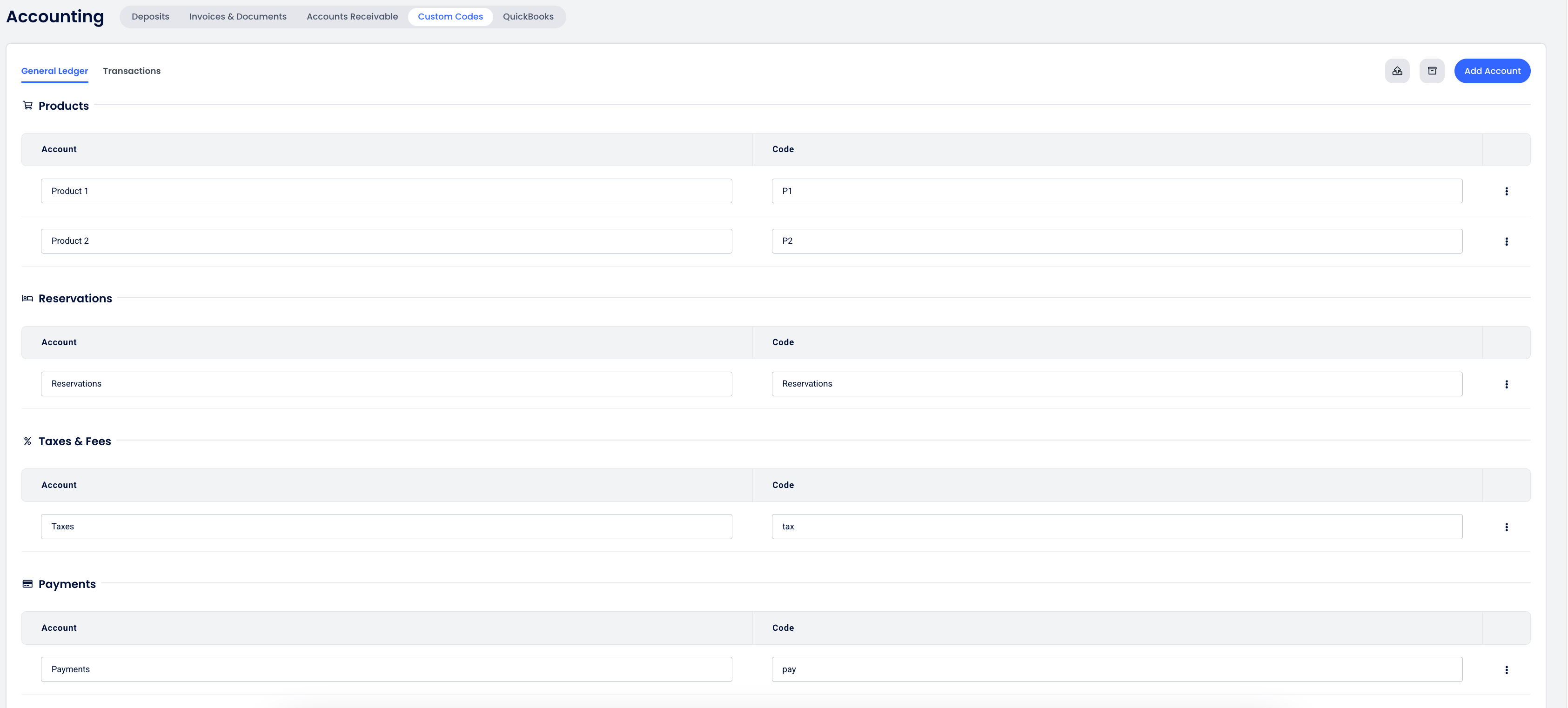
Custom code mapping
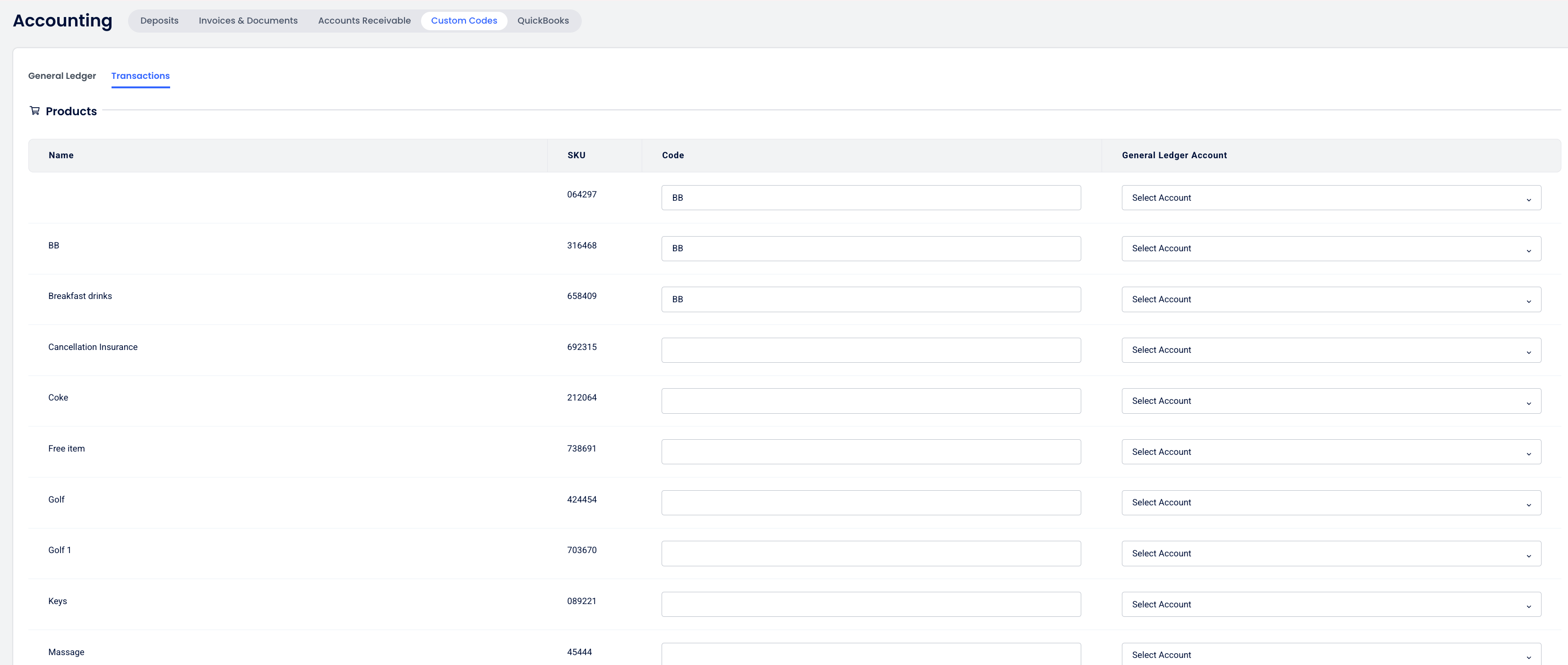
Custom Transaction Codes are used to identify each kind of transaction in Cloudbeds. You can create a code that is easy for you to understand and that matches the accounts in your other accounting system.
In the Custom Code mapping page, the user can assign a custom code, as well as the General Ledger accounts.
Night Audit
By default, the Cloudbeds Night Audit runs automatically at 2:00 AM property local time. Properties can also set a custom time for the Night Audit to run automatically between 12:00 AM and 6:00 AM in 30-minute intervals. The user can also trigger the night audit manually.
As part of the process, pending transactions (e.g., room charges, taxes, and add-ons) are posted and they are retrievable via the Accounting API from the time the Night Audit is completed.
To receive a notification when the night audit is completed, subscribe to the nightAudit/completed webhook.
Service date vs. transaction date
Typically, the service date is usually the same as the transaction date. However, this may differ for past transactions:
- The service date will represent the date the transaction is intended to apply to (e.g., a past date).
- The transaction date will always show when the record was actually updated in the system.
- This approach ensures safe, immutable, and auditable records for accounting, while corrections to past transactions can be made without compromising the integrity of the accounting records.
Comparison Table
| Aspect | Transaction Date | Service Date |
|---|---|---|
| Definition | Current datetime | Stable date in property time |
| Modification | ❌ Cannot be modified | ✅ Can be modified (with proper permission) |
| Time Restrictions | Current or future only | Can be in the past/future |
| Primary Use | Accounting purposes | Financial reporting purposes |
Transaction webhook
To receive a notification when a new transaction is posted, you can subscribe to the accounting/transaction webhook.
Once the webhook is triggered, the transaction can be pulled via the transaction API, using filters such as id or transaction_datetime
Key terms
Posted Transactions will be immutable. This means that once the transaction is posted, it cannot be edited. If an operational error occurs, a subsequent transaction will be necessary to rectify the mistake―a procedure that falls in line with standard accounting principles. One example of an operational error is that a transaction is converted from pending to posted instead of being canceled / voided. So the only way to rectify this is to create an Adjustment on the Rate, Tax and so on.
Pending Transactions, however, will be mutable. This means that the status of transactions in this table can be modified. The primary purpose of this table is to facilitate operational processes, providing additional flexibility for actions that can be performed without impacting account balances.
Source (& sub-source) is the main bucket of where the transactions belong. Currently there are 3 sources: Reservation, House Account, and Group Folio. Sub-source is unique to Reservation since multiple room-reservations can exist in a single reservation.
Parent is the transaction that is used to derive other transactions. For example, a room tax of 3% will have a Parent of the room rate.
Root is the original transaction in a chain of adjustments and changes. For example, the transaction to void a credit card payment will have a Root of the original credit card transaction.
Origin is the template/setup that drives how the transaction and the amount are created. For example, a tax transaction will have an Origin of tax setup id.
External relation is for other parts of the platform to associate transactions with other entities. For example, a processed payment transaction will have a unique identifier for payment gateway.
Pull transactions via the Accounting API
Posted transactions can be pulled via the POST/ accounting/v1.0/transactions endpoint.
Here are some examples of requests to this endpoint
- Example 1: Update Room Price and Routed Transactions
- Example 2: Void Transactions
- Example 3: Delete a Reservation
- Example 4: Update Accommodation Type
- Example 5: Void Adjustments
In case you need additional examples, please reach out to us.
Important considerations**
Request
- The limit parameter can be set to a maximum of 1100 records
- For pagination, you should include the nextPageToken in the response to your request to retrieve the additional pages. When "nextPageToken": null, this means that there are no additional pages.
- Here are some examples of filters that can be used in the transactions endpoint:
Transaction dates
		    "and": [
        {
          "operator": "greater_than_or_equal",
          "value": "2025-04-01t08:59:00z",
          "field": "transaction_datetime"
        },
                {
          "operator": "less_than_or_equal",
          "value": "2025-04-02t17:59:00z",
          "field": "transaction_datetime"
        }
      ]
    },
Reservation
          "and": [
            {
              "operator": "equals",
              "value": "7090352557675",
              "field": "source_identifier"
            },
            {
              "operator": "equals",
              "value": "RESERVATION",
              "field": "source_kind"
            }
          ]
    },
Group
			{
          			"and": [
            		{
              			"operator": "equals",
              			"value": "{{group code}}",
              			"field": "source_identifier"
            		},
            		{
              			"operator": "equals",
              			"value": "GROUP_PROFILE",
              			"field": "source_kind"
            		}
          			]
House Account
			{
          			"and": [
            		{
              			"operator": "equals",
              			"value": "{{group code}}",
              			"field": "source_id"
            		},
            		{
              			"operator": "equals",
              			"value": "HOUSE_ACCOUNT",
              			"field": "source_kind"
            		}
          			]
Transaction ID
          "and": [

            {
              "operator": "equals",
              "value": "170453859434653",
              "field": "id"
            }
          ]
    },
Internal transaction codes and date
       "and": [
        {
          "operator": "greater_than_or_equal",
          "value": "2024-04-01t08:59:00z",
          "field": "transaction_datetime"
        },
                {
          "operator": "less_than_or_equal",
          "value": "2025-04-02t17:59:00z",
          "field": "transaction_datetime"
        },
                       {
          "operator": "in",
          "value": ["1000V", "1000A", "1000"],
          "field": "internal_code"
        }
      ]
    },
Response
- The
sourceKindin the response points to what type of ID can be found in thesourceId. At the moment the source of the transaction can be categorized as Reservation, House Account, Group Account & Accounts Receivable
For"sourceKind": "RESERVATION"&"sourceKind": "GROUP_PROFILE", thereservationIDorgroupCodeare returned in thesourceIdentifierfield. ThesubSourceIdentifierpoints to the sub-reservation ID in the case of reservations.
Accounts receivable
Accounts Receivable is an add-on feature that properties can use to manage outstanding balances more effectively, ensuring better organization of guest folios and centralized tracking of unpaid amounts.
The ‘Manage Accounts Receivable’ KB explains the process to create Accounts Receivable ledgers, transfer the balance and manage the ledgers from a user perspective.
From the API point of view, here are some endpoints related to Accounts Receivable:
-
Call GET/ accounting/v1.0/accounts-receivable-ledgers to retrieve a list of Accounts Receivable ledgers created for a property.
This endpoint returns the ledger ID, as well as the total amount, paid amount and outstanding balance.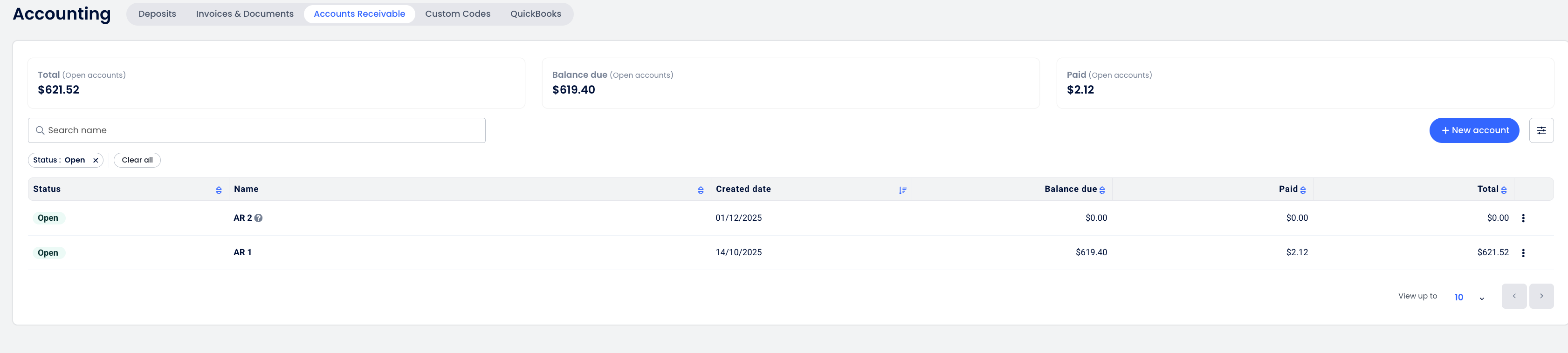
-
To retrieve all the transactions linked to an Accounts Receivable ledger, call GET/ accounting/v1.0/accounts-receivable-ledgers/accountsReceivableLedgerId/transactions
- Transfers to the Accounts Receivable ledger are identified with
internalTransactionCode: "7000". - Payments are identified with the relevant payment internal transaction code
- Transfers to the Accounts Receivable ledger are identified with
Transactions transferred to an Accounts Receivable ledger can also be retrieved via the POST/ accounting/v1.0/transactions endpoint. When you call the transactions endpoint, including any filters such as transaction_datetime, the Accounts Receivable transfers will be returned.
Each Accounts Receivable transfer will generate two transactions with internal transaction code 7000:
- Transfer of the outstanding balance from the reservation folio
       {
            "id": "170454363713670",
            "propertyId": "200934",
            "internalTransactionCode": "7000",
            "customTransactionCode": null,
            "generalLedgerCustomCode": null,
            "amount": -63.00,
            "currencyScale": 2,
            "currency": "USD",
            "customerId": null,
            "rootId": "170454363713670",
            "parentId": null,
            "sourceId": "147417421",
            "subSourceId": null,
            "sourceKind": "RESERVATION",
            "account": null,
            "externalRelationId": "170452491735229",
            "externalRelationKind": "ACCOUNTS_RECEIVABLE",
            "originId": "147417421",
            "routedFrom": null,
            "quantity": 1,
            "description": "Transfer to Accounts Receivable Ledger",
            "userId": "305998",
            "sourceDatetime": "2025-11-24T15:22:26.269167Z",
            "transactionDatetime": "2025-11-24T15:22:26.269167Z",
            "transactionDatetimePropertyTime": "2025-11-24T15:22:26.269167Z",
            "serviceDate": "2025-11-24",
            "createdAt": "2025-11-24T15:22:26.268614Z",
            "sourceIdentifier": "2122562693456",
            "subSourceIdentifier": null
},- Transaction to post the pending balance into the Accounts Receivable ledger
        {
            "id": "170454363713671",
            "propertyId": "200934",
            "internalTransactionCode": "7000",
            "customTransactionCode": null,
            "generalLedgerCustomCode": null,
            "amount": 63.00,
            "currencyScale": 2,
            "currency": "USD",
            "customerId": null,
            "rootId": "170454363713670", // It relates to the original transaction in the reservation folio
            "parentId": null,
            "sourceId": "155867866472624", // Accounts receivable ledger ID
            "subSourceId": null,
            "sourceKind": "ACCOUNTS_RECEIVABLE_LEDGER",
            "account": null,
            "externalRelationId": "170452491735229",
            "externalRelationKind": "ACCOUNTS_RECEIVABLE",
            "originId": "147417421",
            "routedFrom": null,
            "quantity": 1,
            "description": "Transfer to Accounts Receivable Ledger",
            "userId": "305998",
            "sourceDatetime": "2025-11-24T15:22:26.269167Z",
            "transactionDatetime": "2025-11-24T15:22:26.269167Z",
            "transactionDatetimePropertyTime": "2025-11-24T15:22:26.269167Z",
            "serviceDate": "2025-11-24",
            "createdAt": "2025-11-24T15:22:26.269781Z",
            "sourceIdentifier": null,
            "subSourceIdentifier": null
        }
It is possible to transfer the balance back to the reservation folio if there was an error, for example.
***Currently, this feature is an optional add-on. If you would like to test this functionality as a Technology Partner, reach out to [email protected] to request the activation of this optional feature, including your Cloudbeds property ID and use case.
Advance deposits
The Deposits Ledger page provides a structured way to handle pre-check-in payments by automatically directing them to a dedicated liability account. This ensures that advance deposits are separated from revenue until services are provided.
This article explains how to manage deposits from a user perspective: https://myfrontdesk.cloudbeds.com/hc/en-us/articles/34261179660571-Manage-your-Deposits-Ledger-in-Accounting
-
Call GET/ accounting/v1.0/settings to pull the
depositConsumptionconfiguration: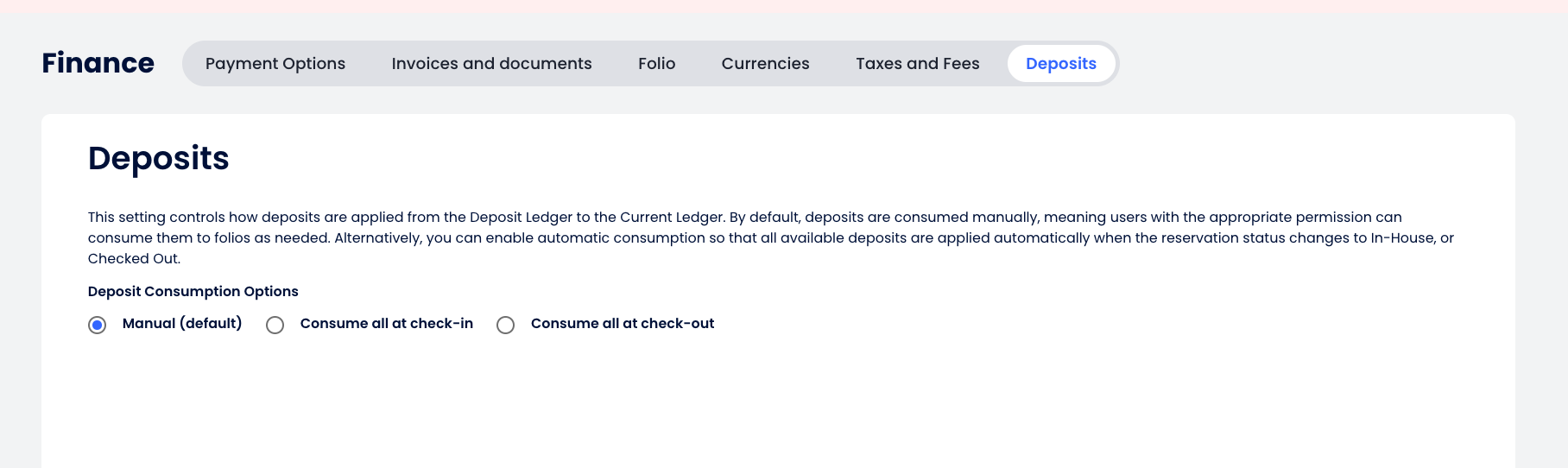
-
To retrieve the balance in the deposit ledger, call GET/ accounting/v1.0/deposits/balance.
-
To pull the transactions posted in the deposit ledger, call GET/ accounting/v1.0/deposits/transactions.
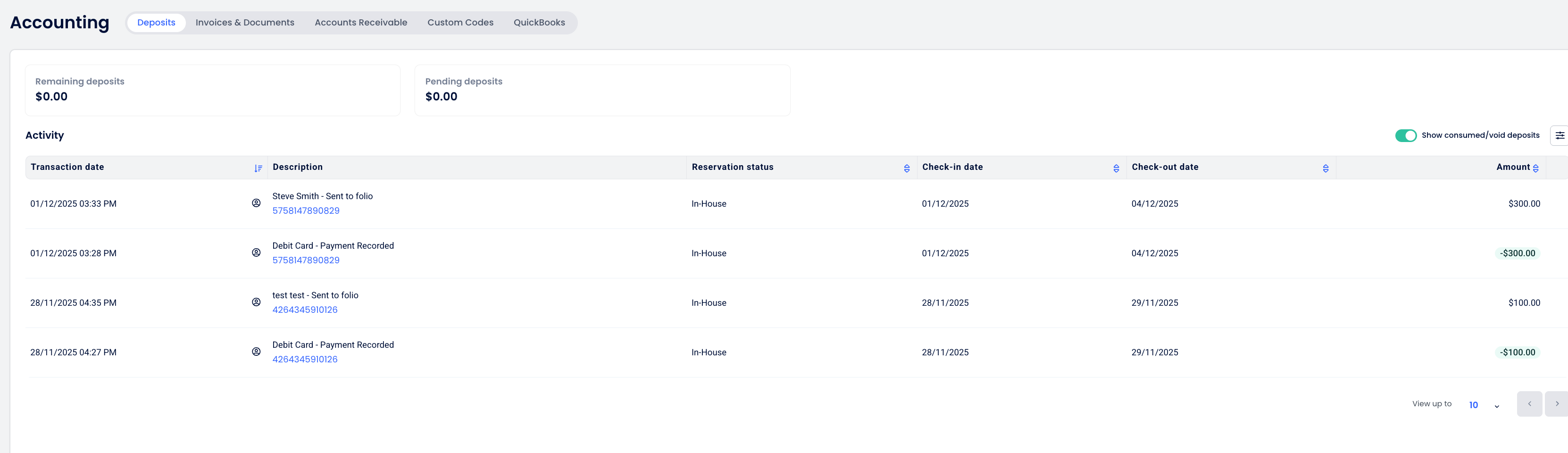
Transactions transferred to the Deposit ledger can also be retrieved the POST/ accounting/v1.0/transactions endpoint. When you call the transactions endpoint, including any filters such as transaction_datetime, the Deposit ledger transactions will be returned.
Here is an example of the transactions generated for a reservation:
- When the deposit payment is recorded, it’s posted to the Deposit ledger. It is not visible in the reservation folio until it is consumed from the Deposit Ledger.
{
    "transactions": [
        {
            "id": "172923470569652",
            "propertyId": "200934",
            "internalTransactionCode": "9000",
            "customTransactionCode": null,
            "generalLedgerCustomCode": null,
            "amount": -300.00,
            "currencyScale": 2,
            "currency": "USD",
            "customerId": "158298262",
            "rootId": "172923470569652",
            "parentId": null,
            "sourceId": "159691825",
            "subSourceId": "207871684",
            "sourceKind": "RESERVATION",
            "account": {
                "id": "27074402140381",
                "description": "Account to store all deposits",
                "name": "DEPOSIT",
                "category": "DEPOSITS",
                "chartOfAccountType": "LIABILITIES"
            },
            "externalRelationId": "206007450",
            "externalRelationKind": "PAYMENT",
            "originId": "check",
            "routedFrom": null,
            "quantity": 1,
            "description": "Debit Card - Payment Recorded",
            "userId": "0",
            "sourceDatetime": "2025-12-01T15:28:44Z",
            "transactionDatetime": "2025-12-01T15:28:45.055837Z",
            "transactionDatetimePropertyTime": "2025-12-01T15:28:45.055837Z",
            "serviceDate": "2025-12-01",
            "createdAt": "2025-12-01T15:28:45.055299Z",
            "sourceIdentifier": "5758147890829",
            "subSourceIdentifier": "5758147890829"
        }
],- As soon as the deposit is consumed from the Deposit ledger and posted in the reservation folio, two transactions are posted to reflect these movements:
  {
            "id": "172923470962870",
            "propertyId": "200934",
            "internalTransactionCode": "6000",
            "customTransactionCode": null,
            "generalLedgerCustomCode": null,
            "amount": 300.00,
            "currencyScale": 2,
            "currency": "USD",
            "customerId": "158298262",
            "rootId": "172923470569652",
            "parentId": null,
            "sourceId": "159691825",
            "subSourceId": "207871684",
            "sourceKind": "RESERVATION",
            "account": {
                "id": "27074402140381",
                "description": "Account to store all deposits",
                "name": "DEPOSIT",
                "category": "DEPOSITS",
                "chartOfAccountType": "LIABILITIES"
            },
            "externalRelationId": "206007450",
            "externalRelationKind": "PAYMENT",
            "originId": "check",
            "routedFrom": null,
            "quantity": 1,
            "description": "Debit Card - Payment Recorded",
            "userId": "305998",
            "sourceDatetime": "2025-12-01T15:33:22.753Z",
            "transactionDatetime": "2025-12-01T15:33:22.768691Z",
            "transactionDatetimePropertyTime": "2025-12-01T15:33:22.768691Z",
            "serviceDate": "2025-12-01",
            "createdAt": "2025-12-01T15:33:22.780121Z",
            "sourceIdentifier": "5758147890829",
            "subSourceIdentifier": "5758147890829"
        },
        {
            "id": "172923470962871",
            "propertyId": "200934",
            "internalTransactionCode": "6000",
            "customTransactionCode": null,
            "generalLedgerCustomCode": null,
            "amount": -300.00,
            "currencyScale": 2,
            "currency": "USD",
            "customerId": "158298262",
            "rootId": "172923470569652",
            "parentId": null,
            "sourceId": "159691825",
            "subSourceId": "207871684",
            "sourceKind": "RESERVATION",
            "account": null,
            "externalRelationId": "206007450",
            "externalRelationKind": "PAYMENT",
            "originId": "check",
            "routedFrom": null,
            "quantity": 1,
            "description": "Debit Card - Payment Recorded",
            "userId": "305998",
            "sourceDatetime": "2025-12-01T15:33:22.753Z",
            "transactionDatetime": "2025-12-01T15:33:22.768691Z",
            "transactionDatetimePropertyTime": "2025-12-01T15:33:22.768691Z",
            "serviceDate": "2025-12-01",
            "createdAt": "2025-12-01T15:33:22.78021Z",
            "sourceIdentifier": "5758147890829",
            "subSourceIdentifier": "5758147890829"
        }
***Currently, this feature is an optional add-on. If you would like to test this functionality as a Technology Partner, reach out to [email protected] to request the activation of this optional feature, including your Cloudbeds property ID and use case.
Reconciliation
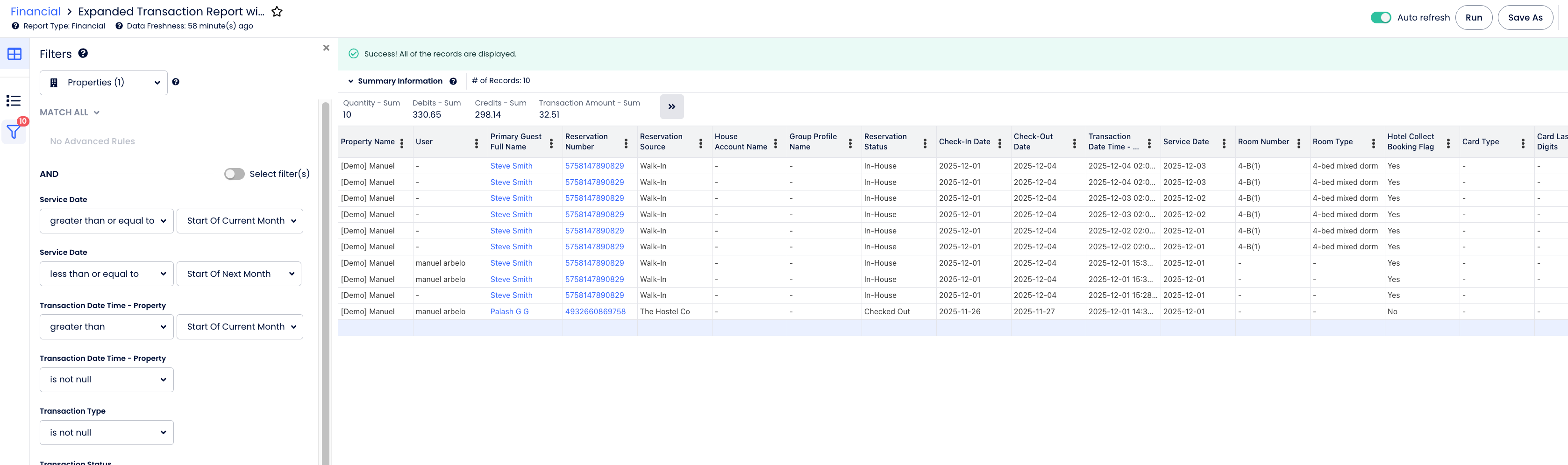
For reconciliation purposes, we recommend the Financial > Expanded Transaction Report with Details within Cloudbeds Insights.
Only the Transaction Amount should be used for reconciliation. It should equal the guest ledger in the accounting system. The transactions should be filtered by transaction date time. Credits and debits from that report should not be considered for accounting purposes, as they are used in the report to match Cloudbeds folio behaviour.
Pending transactions
It is possible to retrieve pending transactions via POST/ accounting/v1.0/pending-transactions, which can be useful for Business Intelligence integrations.
Pending transactions are the transactions that you can see in a folio only if you filter for them. They show what has not yet been posted to the folio, but is expected to be posted when the night audit happens.
As opposed to posted transactions, pending transactions are mutable, so you should cross-check if the pending transactions are eventually posted before considering these transactions are definite.
Invoices
- We are currently migrating properties to our new Fiscal Documents service. Once a property is migrated, invoices are available in the Fiscal Documents API.
- Please refer to Government: Fiscal Docs blueprint for guidelines about this integration functionality.
- Document retrieval - querying invoices, receipts, transactions, and recipient data tied to reservations and group bookings. This is useful for reporting pipelines, accounting system syncs, or any workflow that needs to read fiscal document data without generating new documents. Full details can be found here: 5 Retrieving Fiscal Documents
- Document retrieval - querying invoices, receipts, transactions, and recipient data tied to reservations and group bookings. This is useful for reporting pipelines, accounting system syncs, or any workflow that needs to read fiscal document data without generating new documents. Full details can be found here:
Updated 3 months ago