

Business Intelligence and reporting
In the modern hospitality landscape, data is more than just a record of the past—it is the roadmap for future growth. To stay competitive, hoteliers need to move beyond static spreadsheets and embrace real-time, actionable insights that drive revenue management, operational efficiency, and guest satisfaction. This blueprint provides a comprehensive framework for developers looking to build or integrate Business Intelligence tools with the Cloudbeds platform. Whether you are building a custom dashboard for a boutique hotel or a multi-property analytics suite for a global group, this guide outlines the optimal paths for data extraction and synchronization.
(Option 1) Cloudbeds Insights API
Cloudbeds Insights allows more flexibility in building your reports to get the exact information you want from the system. Fields, filter logic, summarization levels, sorting, columns, and other features can be configured to meet your preferences.
Cloudbeds Insights offers two report types:
- Cloudbeds Reports: Ready to use reports with preselected columns and filters. These reports can be exported as they are or used as "templates" and customized based on your property needs.
Cloudbeds reports are available to all properties and can be retrieved via the Stock Report API endpoints. - Saved Reports: On Saved Reports page, you can create new report from scratch and find all the reports that have been saved.
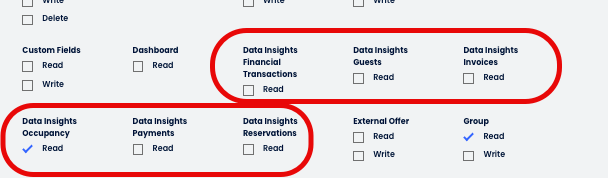
Saved reports are identified as Reports in the Insights API. Technology partners can access custom 'Reports' and their data if the Data Insight related scopes are selected.
For property-level users, custom reports are only accessible if Cloubeds Insights Report Builder is enabled in the Account.
Cloudbeds Insights integration flow
Initial configuration
- Send a GET request to datainsights/v1.1/health to validate that data is up to date.
- Call GET datainsights/v1.1/datasets to obtain all the available Cloudbeds Datasets and their corresponding ID. Each dataset is linked to an API Scope:
- Call Get Dataset by id, List of multi-levels per dataset and List of multi-level CDFs associated by dataset to retrieve the data structure for each Dataset.
This information is relevant to understanding the dataset structure and the Cloudbeds Data Fields (CDF) available when creating custom reports.
Stock reports
Cloudbeds Reports, also referred to as Stock Reports, are pre-designed reports with selected columns and filters that can be exported as they are. They cannot be modified or deleted, but Cloudbeds Insights customers have access to helpful features outlined in this article.
There are different types of reports, such as Financial, Guests, Reservations, Occupancy, Payment, Invoices, Housekeeping, etc. The report list can vary by country and region, as well as the Cloudbeds package.
Stock reports data, filters, columns... may vary depending on our Product needs. For this reasonn, as a technology partner, we do not recommend pulling stock reports, but using custom reports instead.
-
Use GET /datainsights/v1.1/stock_reports to retrieve a list of Stock Reports available for a property and their ID. The stock report ID is also available in the report URL:

-
Get stock report data by id returns the report data based on the filters saved in Cloudbeds Insights UI.
-
With the POST Query stock report data endpoint, it is possible to pass specific values within the filters available in the Stock Reports UI.
This endpoint is POST due to the fact that the complex filters need to be included in the report body, but it works as a GET to return data. -
Get stock report export by id exports the requested stock report into xlsx, csv or json. The API returns an URL to access the exported stock report.
Reports
With Cloudbeds Insights, you can create your own reports and get the exact data you need. Fields, filter logic, summarization levels, sorting and columns can all be configured to meet your preferences. On your Saved Reports page, you can find all the reports that have been created and saved.
It can be valuable to first create a report in the Cloudbeds Insights UI within Cloudbeds with the data that is needed in your integration. Then you can use the API to pull the structure of that report and use it to make future requests against the query endpoint.
As a technology partner, we recommend using custom reports for your integrations to have stable data points, since stock reports are subject to changes depending on product needs. If you need access to the Custom reports tab, email [email protected] detailing your use case as a technology partner to request access.
-
Use GET datainsights/v1.1/reports to retrieve a list of Reports available for a property and their ID. The report ID is also available in the report URL:

-
Get report by id returns the report data structure. After creating the report in the UI, we recommend using this endpoint to pull the report structure and then request the data according to the next point.
-
With the POST Query report data endpoint, it is possible to pull custom report data. This is the recommended endpoint to pull Cloudbeds Insights data for technology partners. Here are the main benefits:
- You build your own report setting the dataset, filters, Cloudbeds Data Fields (CDF) that you require.
- It is a stable solution not subject to changes in the same way as Stock Reports.
- As long as the relevant dataset scopes are enabled, this API will return custom report data without creating the report in the UI for each property and even if the property does not have access to build custom reports.
-
Query report data and export to file exports the requested report data into xlsx, csv or json. The API returns an URL to access the exported stock report.
(Option 2) Pull raw data from Cloudbeds PMS
- Retrieve property-level configuration, including currency and time zone via getHotelDetails..
- Identify the configured payment methods for the property using getPaymentMethods.
- Fetch configured taxes and fees by calling getTaxesAndFees..
- Determine applicable taxes and fees for each reservation source with getSources.
- Access Items (products and services) and categories using getItems and getItemCategories.
- Query item/v1/custom-items to retrieve items created by POS integrations.
- Pull a list of add-ons via addons/v1/addons
- List all active house accounts with getHouseAccountsList
- Obtain the groups created for the property with getGroups
- Pull transaction and accounting data, as detailed in our Accounting Blueprints
- Use the reservation and guest endpoints to pull reservation data.
FAQ
Split inventory room relations
What’s the ‘split inventory’ functionality?
Split inventory allows properties to sell a physical space in multiple ways, maximizing revenue and occupancy. To understand occupancy calculations, it's crucial to differentiate between:
- Physical rooms: These are the actual "keys" or physical spaces available at your property. They always have associated capacity and are the only room types that contribute to occupancy calculations.
- Virtual rooms: These are not physical "keys" and do not have capacity. They represent flexible ways to sell a physical space (e.g., combining two standard rooms into a suite).
How do Occupancy/revenue Metrics work with Split Inventory?
While capacity and rooms sold are linked to physical rooms, revenue is always associated with the actual room that was booked, whether it was a physical or a virtual room.
How are the Accounting codes related to each transaction type?
| CDF | Accounting Codes |
|---|---|
| Room Rate | 1000 + 1000R + 1000V |
| Total Room Revenue Adjustments | 1000A + 1100A + 1200A |
| Other Room Revenue | 1100 + 1100R + 1100V + 1200 + 1200R + 1200V |
| Total Room Revenue | 1000 + 1000R + 1000V+1100 + 1100R + 1100V + 1200 + 1200R + 1200V +1000A + 1100A + 1200A |
| Other Revenue | 3000+3000V+3000R+2000+2000V+2000R+4000+4000V+4000R+2900+2900R+2900V |
| Total Other Revenue Adjustments | 3000A+2000A+4000A+2900A |
| Total Miscellaneous Income | 5000+5000A+5000V+5000R |
| Total Other Revenue | 3000+3000V+3000R+2000+2000V+2000R+4000+4000V+4000R+3000A+2000A+4000A+5000+5000A+5000V+5000R+2900+2900R+2900V+2900A |
| Total Revenue | 1000 + 1000R + 1000V + 1100 + 1100R + 1100V + 1200 + 1200R + 1200V + 1000A + 1100A + 1200A+5000+5000A+5000V+5000R+3000+3000V+3000R+2000+2000V+2000R+3000A+2000A+4000+4000V+4000R+4000A+2900+2900A+2900V+2900R |
| Total Taxes | 8000+8000R+8000V+8000A |
| Total Fees | 8100+8100R+8100V+8100A |
Updated 3 months ago